

VROC™ by Graid Technology Inc. 26.2 VC1 Release Notes for Windows*

 VROC™ by Graid Technology Inc. 26.2 VC1 Release Notes for Windows* VROC™ by Graid Technology Inc. 26.2 VC1 Release Notes for Windows* | ||||||||||||||||||||||||||||||||||||||||||||||||||||||||||||||||||||||||||||||||||||||||||||||||||||||||||||||||||||||||||||||||||||||||||||||
VROC™ by Graid Technology Inc. 26.2 VC1 Release Notes for Windows*Date:5/25/26 Release notes for VROC™ by Graid Technology Inc. for Windows* — VROC 26.2 VC1.
Release Highlights
IntroductionOverviewThe VROC family of products provides enterprise RAID solutions for both NVMe* SSD and SATA devices for enterprise servers and workstations:
"VROC" is a high-level blanket product reference for both VROC (VMD NVMe RAID) and VROC (SATA RAID). Terminology
Reference OEM Platform DocumentationRefer to your OEM for a full list of available features. If any of the information in this document conflicts with the support information provided by the platform OEM, the platform documentation takes precedence. Supported Platforms, Chipsets, and SKUsThe VROC package is designed to work on customer platforms that are based on the following Intel reference platforms. Supported Platforms for VROC (VMD NVMe RAID)
† The number of available VMD controllers depends on the PCIe lane count of the exact CPU model. Supported Chipsets for VROC (SATA RAID)
Supported Operating SystemsFor the latest support matrix for operating systems with VROC, see Supported Operating Systems. Supported PCIe NVMe* SSDsAll shipping Intel® NVMe* SSDs are supported by the latest version of VROC, except dual-port NVMe* SSDs. For the latest list of supported non-Intel PCIe NVMe* SSDs, see Supported NVMe* Drives. Platform providers are allowed to self-validate their own list of NVMe* SSDs for use with VROC (VMD NVMe RAID). For more details, contact your platform provider. New FeaturesThe following features are introduced in the VROC 26.2 VC1 release. UEFI LicensingThis release introduces a new UEFI-based licensing mechanism. Each license is tied to a particular baseboard serial number (BSN) and is generated at the time of request. The generated VROC license can be uploaded into the system BIOS using one of two methods available in this first release (26.2):
For more information about the architecture or usage of the VROC UEFI Licensing feature, refer to the Technical Product Specifications or the User Guide for Windows*, respectively. Note The VROC hardware (HW) license key is still consumed by the VROC 26.2 driver on Granite Rapids server- and workstation-based platforms. On future platforms, the UEFI licensing mechanism will be required to activate VROC. VROC Windows* and UEFI GUI Visual UpdatesThis release introduces several visual changes to the VROC Windows* GUI and the VROC UEFI HII menu.
Drivers, Images, and UtilitiesThe VROC release package is constructed of several components. The following are those components and their corresponding version numbers. Note Because the components are different entities (but are all required for the product to work properly), the component version numbers may not match each other and will differ from the package version number. The numbering convention has also changed starting with VROC 26.2 — see the Technical Product Specifications for details. VROC UEFI Drivers
All of these images are required to support VROC (VMD NVMe RAID) and VROC (SATA RAID) functionality as a combined installed package. VROC Windows* Drivers
VROC UEFI Utilities
VROC IssuesResolved Issues in the VROC 26.2 ReleaseNo issues were resolved in VROC™ by Graid Technology Inc. 26.2 VC1. Known Issues in the VROC 26.2 Release
Deprecated VROC FeaturesThe following features are deprecated in the VROC 26.2 release. OOB limitation with the RAID1-Only SKUWhen VROC is running in pass-thru mode or is licensed with the RAID1-Only SKU, PLDM Redfish Device Enablement (RDE) support is limited so that only the Storage Controller Collection and individual Storage Controller resources are returned, allowing basic controller-level discovery. No physical drives or RAID volumes are presented through RDE PLDM, and management and configuration actions are not supported. Remove Montage IOH supportSystem-level support for Montage IOH SATA controllers has been removed. They no longer appear as RAID-capable devices in management utilities or the VROC storage layer. Remove the VROC trial periodThe 90-day premium trial feature for the Windows* VROC (VMD NVMe) product has been removed. If no license is installed in the platform, the product operates in pass-thru mode. Remove the VROC Windows UI (UWP package) from the Microsoft StoreThe VROC Windows* UI is no longer available in the Microsoft Store and is only available through the Remove the managed unplug featureThe managed unplug (eject drive) feature is completely removed from the Windows* VROC user interface and CLI tool. Physically hot-pluggable drives continue to rely on native OS and platform-level hot-plug handling. This change does not affect normal array operation, hot-plug detection, or recovery behavior; it only removes the dedicated GUI and CLI entry points for triggering a managed unplug operation. Remove Journaling Drive supportReview before upgrading After upgrading to VROC™ by Graid Technology Inc. from Intel® VROC, any drive previously used as a Journaling Drive (JD) is marked incompatible in all user interfaces and tools, and the associated RAID5 volume switches to Partial Parity Logging (PPL) to maintain RWH closure. VROC is removing support for the Journaling Drive (JD) feature in RAID5 configurations. User interfaces and tools — including the UEFI HII, the Windows* VROC GUI, and the Windows* VROC CLI — do not display or allow the use of JDs in RAID5 configurations. Remove Matrix RAID supportAction required before upgrading Migrate data on existing Matrix RAID arrays to a non-matrix VROC array before upgrading to VROC 26.2, to avoid potential issues. VROC no longer supports the creation of Matrix RAID configurations. Existing Matrix RAID arrays continue to operate and are not expected to be disrupted, but Matrix RAID is no longer an officially supported or validated feature. This change affects volume creation and support status only. 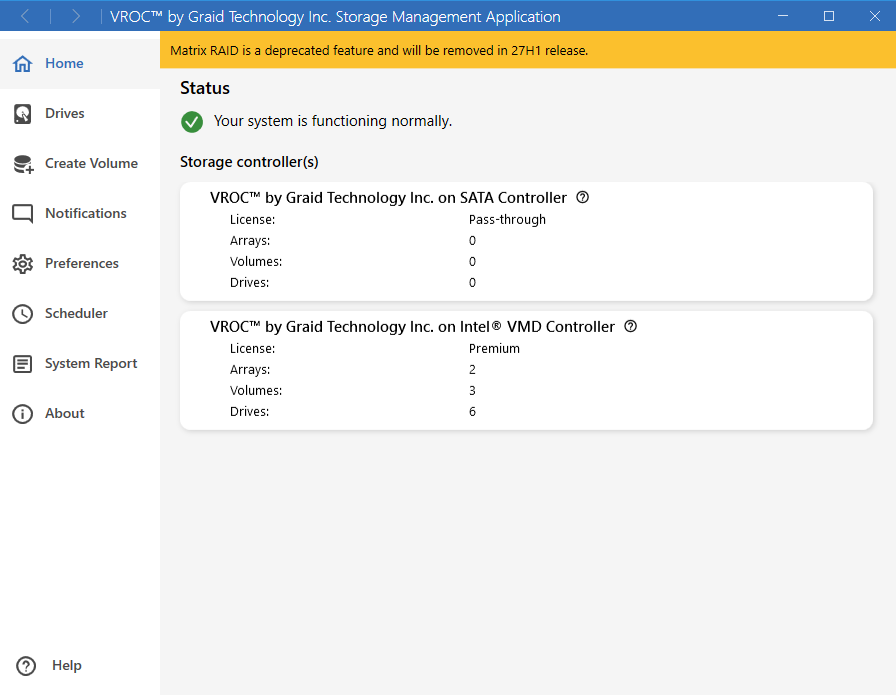 Reduction of supported languages in the Windows GUI and InstallerThe Windows* GUI and Windows* Installer support only two languages: English and Simplified Chinese. All other previously supported languages are removed from the Windows* GUI and Installer. Related |