

SupremeRAID™ Product Activation Guide
Important Notes
- The warranty period begins on the date the license is generated.
- Warranty service is provided only for activated licenses. Trial activation codes and trial licenses are not eligible for warranty coverage.
- If a GPU becomes defective, you may select an existing license and rebind it to a new GPU to generate a replacement license. Once the rebinding is completed, the original license will be marked as Inactive. Each activation code supports up to three GPU rebinds. Graid Technology shall have no obligation to provide support for any environment operating with Inactive license keys.
- A GPU Serial Number or UUID can only be used to generate one active license at a time and cannot be reused to generate multiple licenses.
About this document
This guide describes the product activation process for SupremeRAID™, outlining the procedures for requesting activation through the SupremeRAID™ Portal using activation codes (prefixed with “AC-”) in conjunction with GPU serial numbers or UUIDs. It further provides detailed instructions for identifying GPU serial numbers or UUIDs via the card label or nvidia-smi, and includes information regarding warranty commencement, as well as activation options available through the SupremeRAID™ Portal or by email.
Activate the code via SupremeRAID™ portal
Step 1: Log in to the Portal
- Navigate to SupremeRAID™ Portal
- Log in with your account, or register a new account.
Step 2: Access Activation Codes
On the home page, locate the "Activation codes" card:- First-time users: Click the "Claim code" button.
- If you’ve already claimed a code: Click "Check" if you have previously used activation codes.
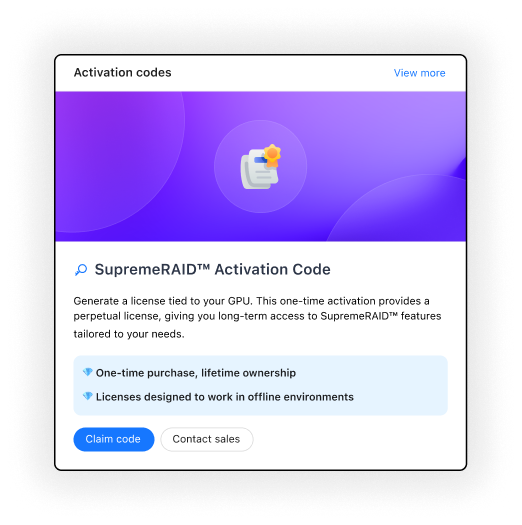
Activation Code Step 3: Claim Activation Code
Once you are on the Activation Codes page, click "Claim activation code"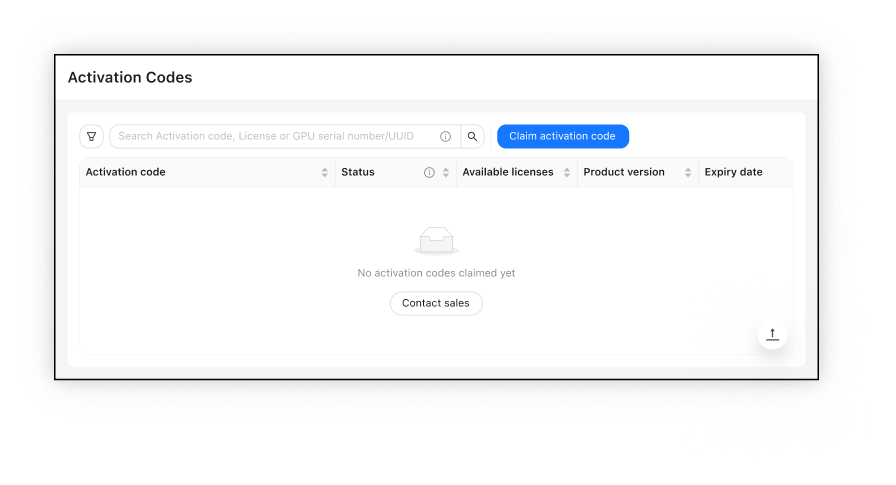
Claim activation code Step 4: Enter Activation Code
You can input your activation code using either claim mode:- Manual claim: Enter your activation code directly in the input field. Example Format:
AC-8K2K4Q8S-8G9LT938-5U8JWGJ-UYO345IJ - Bulk claim (CSV): Upload a CSV file containing multiple activation codes for batch processing.
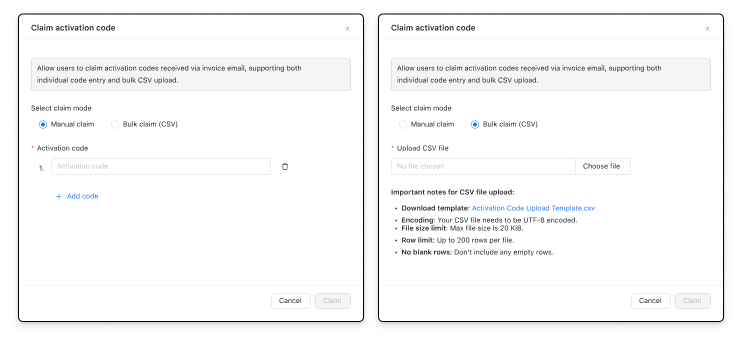
Enter activation code - Manual claim: Enter your activation code directly in the input field. Example Format:
Step 5: Generate License
Select a successfully claimed activation code and click "Generate license".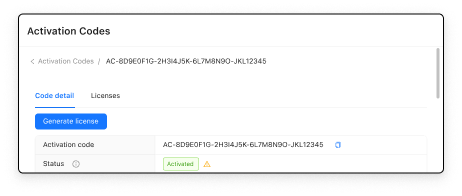
Generate license Step 6: Enter GPU Information
On the license generation modal, manually enter or upload your GPU Serial Number or GPU UUID.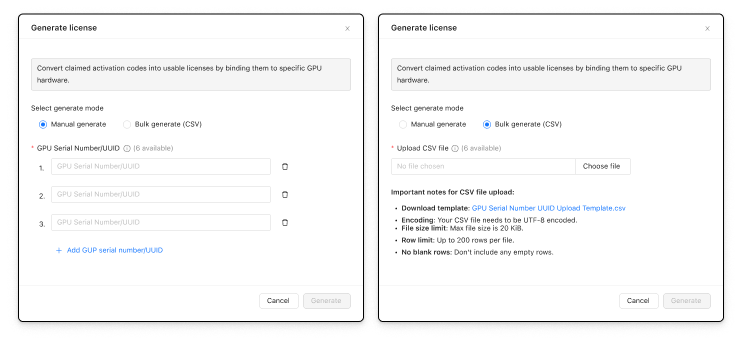
Enter GPU information How to Find GPU Serial Number and GPU UUID
- From the Card Label: Locate the 13-digit serial number on the GPU card label (e.g., 1234567890123).
- Using nvidia-smi: Run nvidia-smi --query-gpu=serial,uuid --format=csv or nvidia-smi -q on a system with NVIDIA drivers installed.
- Example Output (csv):
serial, uuid 1234567890123, GPU-05cdba69-f32c-a62c-55ae-9f9eb4bf85bd - Example Output (detailed, partial):
Serial Number                         : 1234567890123
GPU UUID                              : GPU-05cdba69-f32c-a62c-55ae-9f9eb4bf85bd
- Example Output (csv):
Notes
Serial number availability depends on GPU support, only data center or Quadro/RTX GPUs may show serial numbers. UUIDs are always available. If you use a gaming GPU card, you may use the UUID instead of the serial number to activate the license.
Step 7: View Generated License
After the license generation is submitted successfully, please click Sync to obtain the latest license status. Once the license is generated, you can view all created licenses in the License List
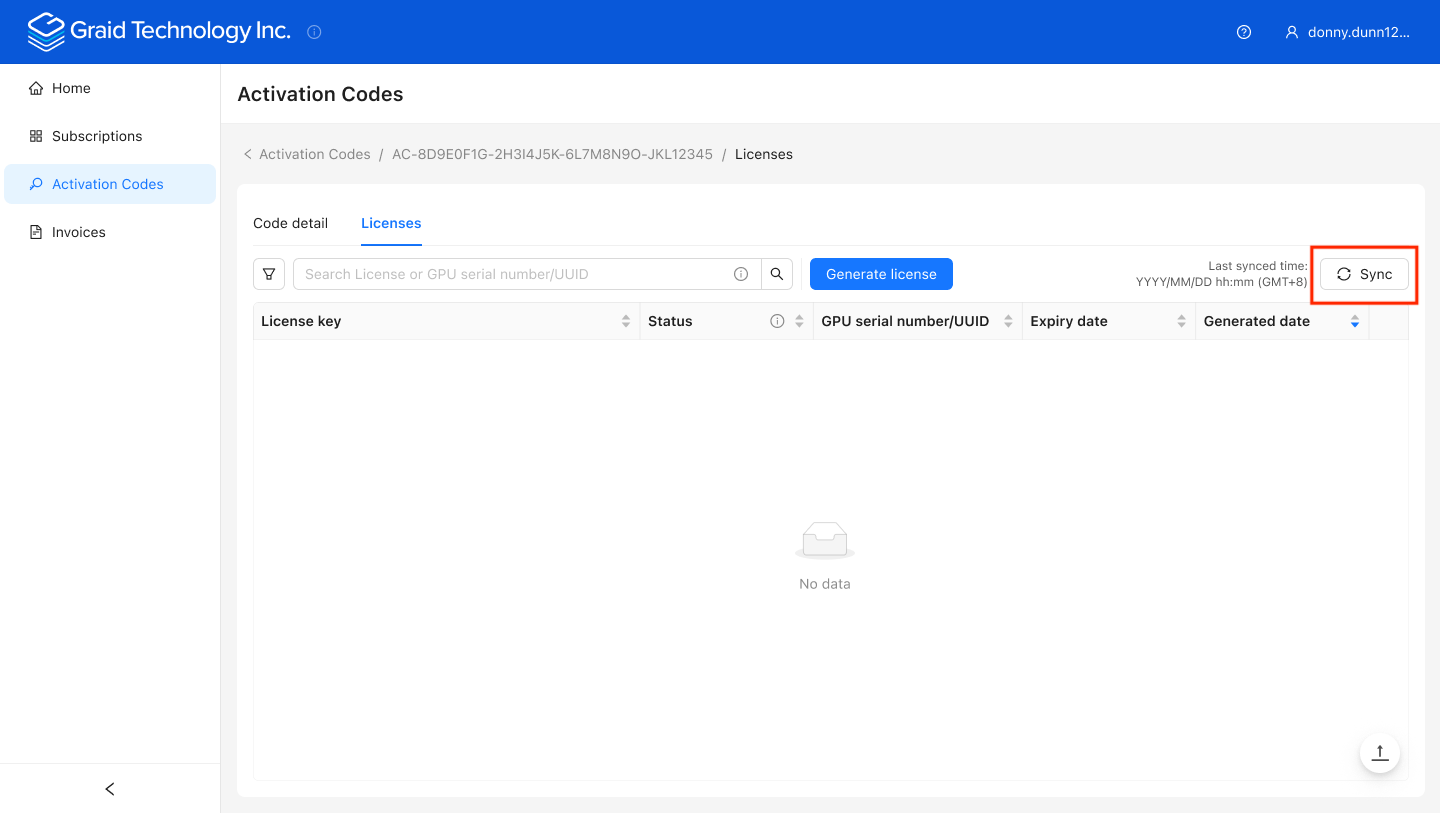
- Step 8: Activate License
In the SupremeRAID™ service, execute Activate license to successfully enable SupremeRAID™ functionality.
Activate the code via email
If you are unable to use the SupremeRAID™ Portal to activate the code, please email licensing@graidtech.com, and use the following template:
Dear Graid Technology Team,

Please activate my product. Provide the following details:

1. Activation Code(s) and Corresponding GPU Serial Number(s) or UUID(s):
Insert Activation Code(s) and Corresponding GPU Serial Number or UUID here, split by comma, one per line, e.g.,
- AC-5WRS8234-VWRSMU0B-5F3FQPU6-862X0ABG,1234567890123
- AC-4XYZ5678-ABCD1234-EFGH9012-IJKL3457,9876543210987

2. Email Address to Bind with Activation Codes and Licenses:
[Insert Chosen Binding Email Address here, e.g., customer@example.com]

Generate the license key(s), bind to the specified binding email (where the license key will be delivered), and send to that address.

Sincerely,
[Customer Name]
[Company Name, if applicable]
[Contact Phone Number, optional]
- Replace placeholders (e.g., [Customer Name], [Insert Activation Code(s) here]) with actual details.
- Ensure the activation code starts with "AC-" and follows the correct format.
- The sender email (From) can differ from the binding email, but the license key will be delivered to the binding email.
- Ensure the number of activation codes matches the number of GPU serial numbers or UUIDs, as activation is a one-to-one mapping. List multiple codes and serial numbers/UUIDs on separate lines.
- Submit the email to licensing@graidtech.com.
Additional Notes
- Warranty starts from the first activation date.
- Serial number availability is limited to data center and Quadro/RTX GPUs, supported only by the SupremeRAID™ AE version, which requires activation via serial number. The SupremeRAID™ SE version supports Quadro/RTX and gaming GPUs (no data center GPUs) and always uses UUID for activation.
- For technical support or assistance, please contact our support team