

Server Vendor Partner Validation Guide
Server Vendor Partner Validation Guide
Subject: Graid Driver & System Compatibility Quick Validation Procedure
Target Audience: System Integrators and Server Vendor Partners
Introduction
This document outlines the standard procedure to validate the compatibility and stability of the Graid Technology SupremeRAID™ AE driver on new server systems. The following tests verify GPU recognition, service status, RAID operations, and data integrity under failure and recovery scenarios.
Prerequisites
- Root Privileges: All commands must be executed with
sudoor as the root user. - Tools Required:
nvidia-smi,fio,graidctl. - Target Drive: Ensure a Graid virtual drive is created and available (referenced herein as
/dev/gdg0n1).
Environment & Driver Verification
Step 1: Verify GPU Detection
Use the NVIDIA System Management Interface to list all available GPUs and ensure the hardware is physically detected.
sudo nvidia-smi
Verification:
Ensure the Graid-compatible GPU appears in the device list.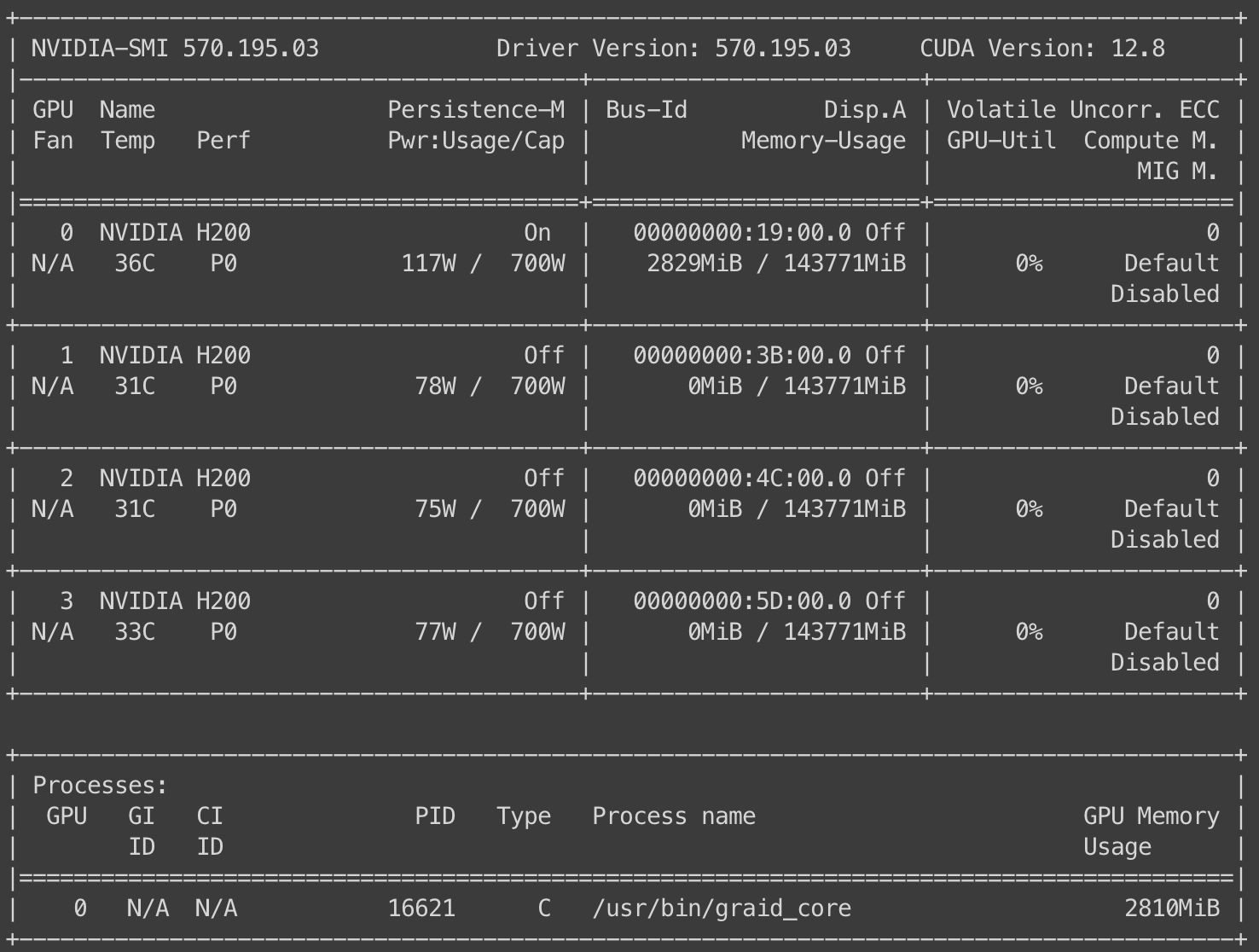
Step 2: Check Fabric Manager Service
Verify that the NVIDIA Fabric Manager service is active and running.
sudo systemctl status nvidia-fabricmanager
Step 3: Verify Fabric Manager Registration
Confirm that the specific GPU is properly registered with the Fabric Manager.
sudo nvidia-smi -i 0 -q | grep -A 3 "^ Fabric"
Verification:
The output should indicate a successful registration status.
RAID Creation & Baseline Integrity Test
Step 4: Create Virtual Drive
Initialize a new Graid virtual drive using your standard configuration parameters.
Step 5: Baseline Data Generation (Write Test)
Assuming the virtual drive is located at /dev/gdg0n1, execute the following FIO command. This writes data to the drive and saves the checksum state for later verification.
sudo fio --filename=/dev/gdg0n1 \
  --ioengine=libaio --direct=1 --name=verify \
  --rw=write --bs=1048576 --numjobs=10 --iodepth=32 \
  --size=10% --offset_increment=10% \
  --cpus_allowed_policy=split \
  --verify=crc32c --verify_fatal=1 --verify_dump=1 \
  --verify_state_save=1 --group_reporting=1
Fault Injection & Degraded State Validation
Step 6: Simulate Drive Failure
Manually force a physical drive into a "Bad" state to degrade the RAID array.
sudo graidctl edit physical_drive 0 marker bad
Verification: Confirm the Drive Group status changes from
OPTIMALtoDEGRADEDorPARTIALLY_DEGRADED.
Step 7: Degraded State Data Integrity Check (Read Test)
Verify data integrity while the Drive Group (DG) is in a compromised state. This ensures data remains accessible and correct despite the drive failure.
sudo fio --filename=/dev/gdg0n1 \
  --ioengine=libaio --direct=1 --name=verify \
  --rw=read --bs=1048576 --numjobs=10 --iodepth=32 \
  --size=10% --offset_increment=10% \
  --cpus_allowed_policy=split \
  --verify=crc32c --verify_only=1 \
  --verify_state_load=1 --verify_fatal=1 --verify_dump=1 \
  --group_reporting=1
Recovery & Maintenance Operations
Step 8: Trigger Rebuild
Mark the physical drive as "Good" to initiate the rebuilding/recovering process.
sudo graidctl edit physical_drive 0 marker good
Step 9: Consistency Check
Once the Drive Group returns to OPTIMAL status, run a consistency check to ensure no data inconsistencies exist.
sudo graidctl start consistency_check manual_task -p stop_on_error
# Monitor status:
sudo graidctl describe consistency_check
Step 10: Copyback Operation
Execute a copyback task to restore data to the original slot (if applicable) or verify copyback functionality.
Note: Replace <SRC_PD_ID> and <DST_PD_ID> with the actual Source and Destination Physical Drive IDs.
sudo graidctl start copyback <SRC_PD_ID> <DST_PD_ID>
# Verify physical drive status:
sudo graidctl list physical_drive
Final Validation
Step 11: Post-Recovery Integrity Check
Perform a final read verification to ensure data integrity remains intact after the rebuild, consistency check, and copyback operations are complete.
sudo fio --filename=/dev/gdg0n1 \
  --ioengine=libaio --direct=1 --name=verify \
  --rw=read --bs=1048576 --numjobs=10 --iodepth=32 \
  --size=10% --offset_increment=10% \
  --cpus_allowed_policy=split \
  --verify=crc32c --verify_only=1 \
  --verify_state_load=1 --verify_fatal=1 --verify_dump=1 \
  --group_reporting=1